
Zendesk Phone System & Contact Center
AI-Powered Callingand Contact Centerfor Zendesk
Connect voice, SMS and chat to Zendesk with customer context, interaction logging and configured AI insights. Also using NetSuite? Keep the same customer conversation connected to both systems.
Contivio for Zendesk
Customer Conversations, Connected to Zendesk
Contivio is an AI-powered business phone system and contact center. In Zendesk, support agents see relevant customer information when an interaction starts, place calls from Zendesk, and have interaction activity logged automatically, with configured AI summaries and follow-up information.
Screen pops
Relevant customer information opens in Zendesk as calls, chats and messages arrive, regardless of channel.
Click-to-dial
Start support calls from Zendesk with a click of the mouse.
Routing by Zendesk fields
Use Zendesk fields to route calls, including sending VIP customers directly to the right support rep.
Activity logging
Link call details to Zendesk records, with call and agent details updated after each interaction.
Ticket creation
Generate new Zendesk tickets from chats and other interactions, and open the new ticket for the agent.
Live chat and SMS/MMS
Transfer live chats to the most qualified agent, and send and receive SMS/MMS alongside calls.
Voice, SMS, live chat and AI connect to the same Zendesk records. Automatically capture AI summaries and follow-up information in your configured Zendesk records.
Zendesk + NetSuite
Zendesk + NetSuite. One Conversation. Both Systems.
Support teams can work in Zendesk while operations work in NetSuite. Contivio connects the customer interaction to the records each team needs, with configurable screen pops and logging in either system or both.
- Screen pop relevant records in Zendesk, NetSuite or both from the same interaction.
- Log interaction activity and configured AI outputs to either system or both.
- Configure destinations around how your support and operations teams work.
An existing customer calls, texts or starts a chat.
Contivio
Demos
See the Integration in Action
Short demos of the Contivio Zendesk integration, covering screen pops, ticket creation, chat and SMS.
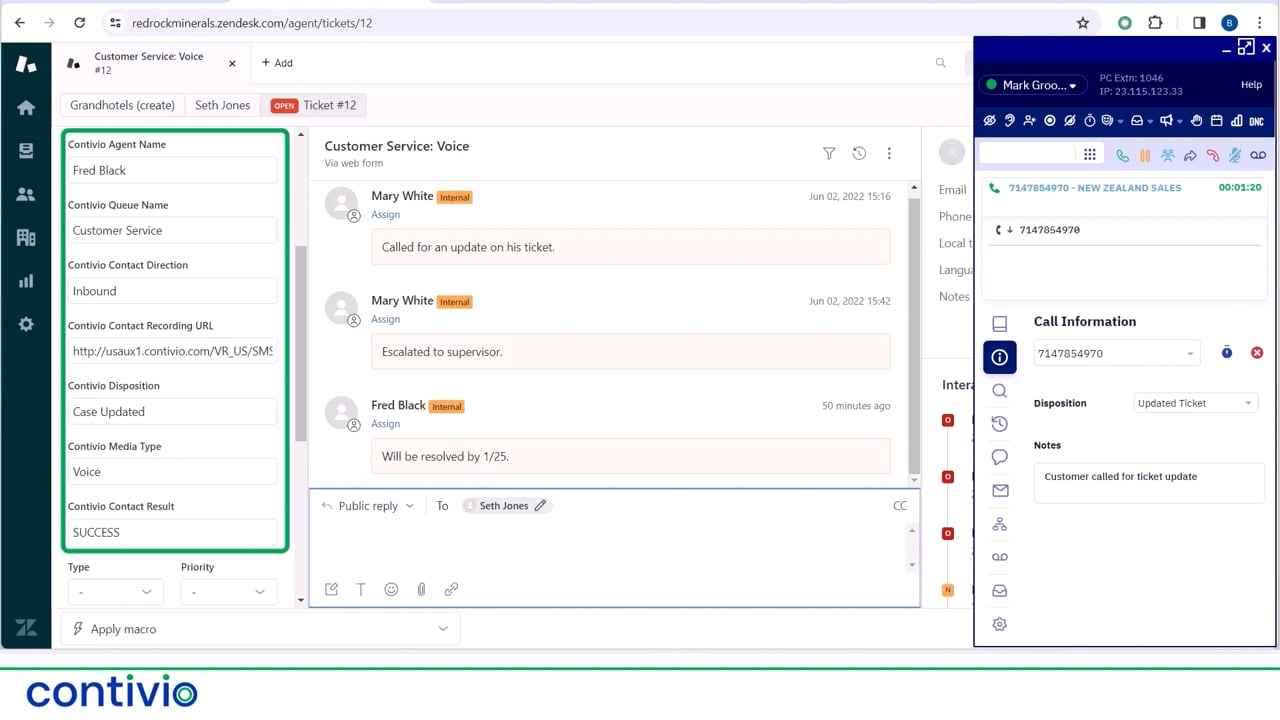
Now showing
Inbound Call Screen Pop
AI and Team Workflows
Put Conversation Context to Work
Give support and operations teams the same picture of each customer conversation, in the system each team already uses.
Interaction history in Zendesk
Calls, chats and SMS/MMS are logged to Zendesk, so the next agent can see earlier conversations before responding instead of asking the customer to repeat themselves.
Summaries and follow-up information
After an interaction is processed, configured AI outputs such as summaries and follow-up information are added where your team has chosen to log them.
Context for operations in NetSuite
If you also use NetSuite, operations and finance teams can see the same interaction activity there, according to your configuration, without support copying notes across.
AI features, outputs and logging destinations depend on your configuration.
Customer Stories
Real Customers. Connected Conversations.
See how teams use Contivio to connect customer conversations, streamline service and capture interaction intelligence in their business systems.

Customer intelligence connected to NetSuite
Amatheon uses Contivio to connect voice, SMS, chat, and AI-powered workflows directly to NetSuite, helping teams capture customer context and act faster.
Explore Customer Stories White LabsFermentation & YeastUnified voice, SMS, chat & support
White Labs consolidated customer communications into a single NetSuite-connected platform for voice, SMS, chat, and support operations.
Explore Customer Stories
Higher productivity through NetSuite
Speedmaster uses Contivio to streamline customer interactions, improve agent productivity, and keep activity connected to NetSuite records.
Explore Customer Stories
AI-powered engagement at scale
Carrot Top uses Contivio to support AI chat, SMS, and voice workflows connected to NetSuite, helping automate customer engagement while preserving human context.
Explore Customer StoriesZendesk FAQ
Common Questions About Contivio + Zendesk
How does Contivio connect calling to Zendesk?
Contivio adds calling and contact center functions to Zendesk. Incoming calls, chats and messages screen pop relevant customer information, agents can click to dial from Zendesk, and call and agent details are updated in Zendesk after each interaction. Contivio can also route calls using Zendesk fields.
Can Contivio work with Zendesk without NetSuite?
Yes. Contivio works with Zendesk on its own. NetSuite is optional and only applies if your organization also uses it.
Can Contivio screen pop Zendesk and NetSuite records from the same interaction?
Yes. From the same interaction, Contivio can screen pop relevant records in Zendesk, NetSuite or both, depending on how your account is configured.
Can activity and AI outputs be logged to Zendesk, NetSuite or both?
Yes. Interaction activity and configured AI outputs can be logged to Zendesk, NetSuite or both, according to your configuration. AI summaries are added after the interaction has been processed.
What AI information can teams capture?
Depending on configuration, Contivio can capture AI transcription, summaries, sentiment and follow-up information for each interaction. These outputs become available after the interaction is processed and are logged to the destinations your team chooses.
What should we ask to see in a Zendesk + NetSuite demo?
Bring a few real support scenarios and ask to see:
- Caller matching for known callers, unknown callers and numbers that match more than one record.
- Which records open, and in which system, when an interaction arrives.
- Where interaction activity is logged in Zendesk, NetSuite or both.
- Where AI outputs appear, and when they become available after the interaction.
Get Started
See Contivio Running with Zendesk and NetSuite
A personalized walkthrough of your calling, support and messaging workflows, including the screen pops, activity logging and AI outputs your teams need.
Only using Zendesk? A standalone Zendesk demo is also available.
Request Your Zendesk Demo
A personalized walkthrough of your Zendesk workflows, including NetSuite if your team uses both.
