Real-time dashboards
Live queue and agent status, waiting interactions and current activity in one view.
Contivio brings inbound and outbound voice, SMS, live chat, routing, recording, supervisor tools and AI together on one platform connected to NetSuite or another supported CRM or ERP. Contivio manages the VoIP service and gives agents the customer context they need before, during and after every interaction.
(opens full-size image in a new tab)
Contivio is a cloud contact center and VoIP platform that connects customer conversations to the CRM or ERP employees already use. It combines inbound and outbound calling, queues, IVR, recording, SMS, live chat, supervisor tools, reporting and optional AI on one platform.
It is used by customer service, sales, collections, order management and support teams that work in NetSuite or another supported CRM or ERP. Contivio provides and manages the VoIP service, and office employees can use the same platform on PBX licenses.
Each team can use its own queues, routing rules, scripts, dispositions and workflows while sharing one platform, one directory and one set of business numbers.
Route customers to the right agent by skill, priority and availability, with the customer record open when the interaction arrives.
Answer inbound leads quickly and work outbound lists with click-to-dial, power dialing and dispositions tied to the record.
Call from approved account lists, record outcomes and follow-up actions, and keep the interaction history on the customer record.
Handle order questions, changes and appointments over voice, SMS and live chat with the relevant customer context in view.
Inside sales, scheduling and other teams that handle customer conversations can run on the same platform.
Contivio applies queue logic, skills, priority and availability to each inbound call so customers reach an agent who can help. Agents see who is calling before they answer, and the conversation can be recorded and logged against the appropriate record.
A ring group rings a defined group of users for a shared line.
An ACD queue applies routing logic, skills, priority, availability and reporting to determine which agent receives the interaction.
Agents can dial from approved CRM or ERP records and lists, record a disposition and notes on each call, and set follow-up actions without leaving their workflow. Sales and collections teams can each run their own campaigns, scripts and outcomes.
Place a call from a phone number on the customer record.
Dial the next contact in a list automatically as each agent becomes available.
Pace outbound calls to agent availability for higher-volume campaigns.
Organize lists, scripts and dispositions by team or objective.
Supervisors get real-time visibility into queues and agents, live coaching tools during calls and the reporting needed to manage service levels.
Live queue and agent status, waiting interactions and current activity in one view.
Track how quickly each queue is answering against the targets you set.
See answered and abandoned interactions by queue and time period.
Review activity and outcomes for each queue, team and agent.
Record calls for review, training and quality programs.
Listen to a live call, coach the agent without the customer hearing, or join the conversation.
Capture a consistent outcome for every interaction so reporting reflects what happened.
Review interactions against your criteria, with AI agent scorecards where AI is enabled.
Agents handle customer conversations across voice, business SMS and live chat on the same platform, with the same customer context.
Inbound and outbound calling with queues, IVR, recording, transfers and conferencing on Contivio’s managed VoIP service.
Text conversations with customers from your business numbers for updates, reminders and follow-ups.
Website chat handled by agents, with the option to start with a configured AI chat agent and hand off to a person with the conversation in view.
How interactions are logged and which CRM or ERP records are created depends on the selected integration and configured workflow.
(opens full-size image in a new tab)
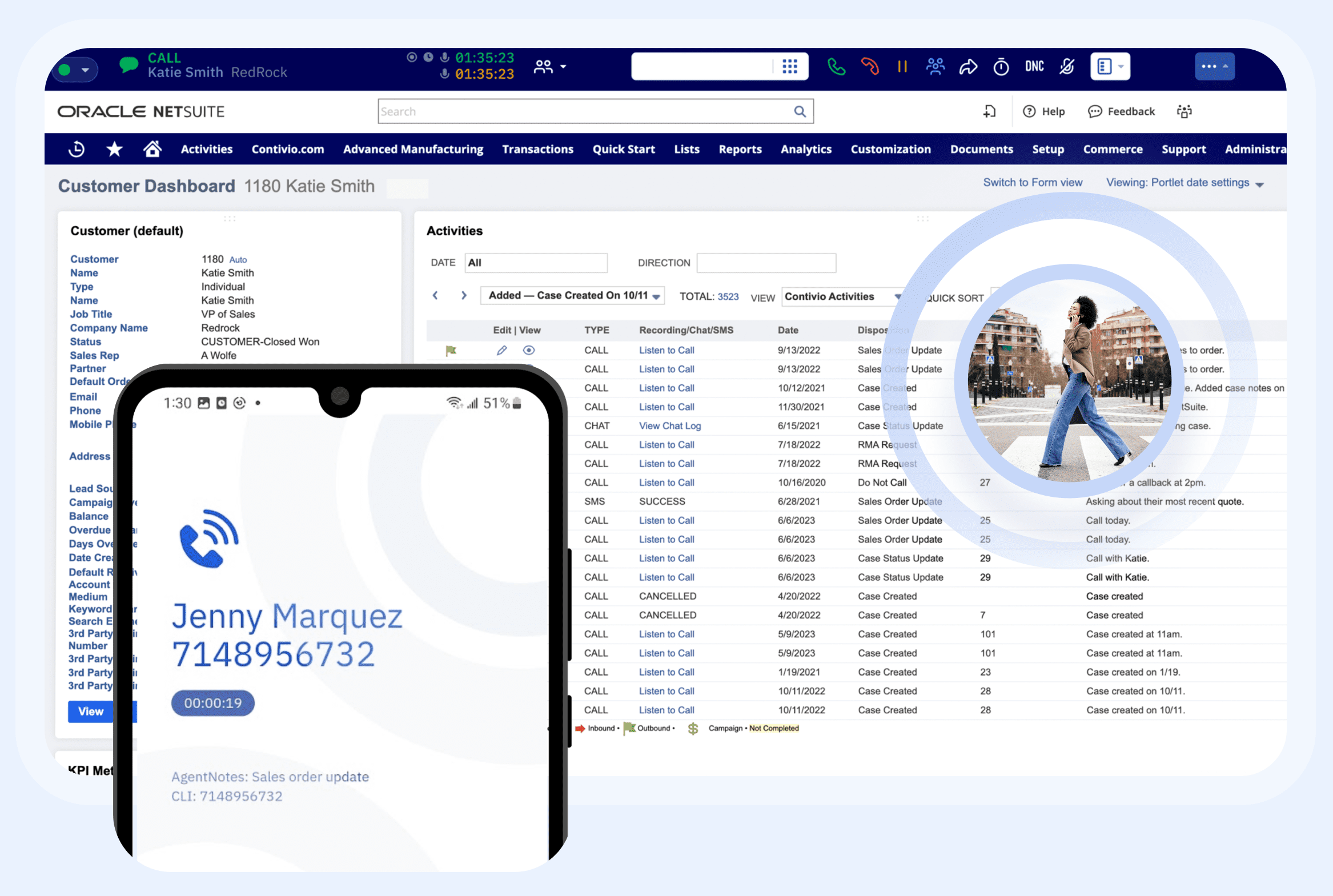
Contivio connects customer conversations to the system your team already uses. Agents can see who is contacting them, work with the appropriate customer context and preserve the interaction history on the relevant record based on the configured workflow.
Calls, SMS, live chat, recordings, transcripts and AI summaries can connect to NetSuite customer, contact, case and supported transaction records, with screen pops, click-to-dial and automatic logging inside NetSuite.
(opens full-size image in a new tab)
Available capabilities vary by platform and configuration.
Contivio AI can transcribe and summarize each conversation, identify sentiment, topics and follow-up actions, and score interactions against your own criteria. Results can be written back to the record, so agents and supervisors work from the same information.
AI capabilities are optional and configured for each deployment.
(opens full-size image in a new tab)Office employees use PBX licenses. Agents use Contact Center licenses. Both run on Contivio, so calls move between agents and office employees without changing phone systems.
“This was by far the smoothest implementation experience I’ve had, and that is saying a lot. Their support team is hands down one of the best vendor support teams I have worked with.”
“The biggest value for us is having our customer conversations captured directly in NetSuite. Our team has the interaction history and context right where they already work.”

Amatheon uses Contivio to connect voice, SMS, chat and AI-powered workflows directly to NetSuite.
Read case study
Speedmaster uses Contivio to streamline customer interactions and keep activity connected to NetSuite records.
Read case study White LabsFermentation & YeastWhite Labs consolidated customer communications into one NetSuite-connected platform for voice, SMS, chat and support.
Read case study
Read how Freedom and Glory works with Contivio.
Read case studyContivio can replace an existing cloud contact center or a legacy PBX or on-premise contact center. Contivio takes the lead on implementation and works through the move in a defined sequence.
Record who uses the current system, the numbers they rely on and the devices that stay in service.
Capture how interactions flow today so they can be rebuilt, and improved where needed.
Decide which employees need agent capabilities and which need business calling only.
Set up screen pops, record matching, logging and any data-driven routing.
Set up SMS, live chat, recording rules and optional AI for each team.
Provision users, applications and supported desk phones.
Test inbound, outbound, transfers, SMS, chat, voicemail and emergency-calling requirements.
Contivio coordinates porting of eligible numbers.
Move teams in stages so each group is confirmed working before the next.
Leads solution design, telephony, queues and routing, CRM or ERP workflow setup, SMS, chat and AI configuration, testing, training and cutover.
Confirms requirements, handles CRM or ERP administration, decides routing, record-matching and logging rules, and completes user acceptance.
Give agents Contact Center licenses and office employees PBX licenses, all on the same system.
For office employees who need business calling.
For agents in sales, service, collections and support.
Usage, AI services, implementation and selected features may be additional.
Answers about channels, routing, integrations, licenses, migration and pricing.
A cloud contact center is contact-center software delivered as a hosted service instead of on-premise hardware. It handles inbound and outbound customer interactions with queues, routing, IVR, recording, supervisor tools and reporting, and agents can work from any location with a supported connection and device.
Yes. Contivio combines inbound and outbound voice, ACD queues, skills-based routing, IVR, callbacks, queue voicemail, call recording, supervisor monitoring, power and predictive dialing, dispositions, reporting, business SMS, live chat and optional AI on one platform. Contivio also provides and manages the VoIP service.
Yes. Inbound teams use ACD queues, skills-based routing, IVR, business-hours and after-hours routing, callbacks and queue voicemail. Outbound teams use click-to-dial, power dialing, predictive dialing, campaigns, dispositions and follow-up actions, including dialing from approved CRM or ERP records and lists.
Contivio can replace an existing cloud contact center, including Five9, 8x8 Contact Center, RingCX, Vonage, Nextiva and Talkdesk, as well as a legacy PBX or on-premise contact center. Contivio leads the migration, from documenting current queues, IVRs, campaigns and routing to testing, coordinating porting of eligible numbers and launching in controlled phases. Requirements are reviewed during planning so the new configuration matches how your teams work.
Yes. Contivio provides and manages the VoIP service for Contact Center and PBX users, so calling, business numbers and the contact-center platform come from one provider.
Yes. Contivio is a native NetSuite SuiteApp. Calls, SMS, live chat, recordings, transcripts and AI summaries can connect to NetSuite customer, contact, case and supported transaction records, with screen pops, click-to-dial and automatic logging. See the NetSuite contact center page for details.
Yes. Contivio also integrates with Salesforce, HubSpot, Zendesk, Microsoft Dynamics and Business Central. Available capabilities vary by platform and configuration, so screen pops, logging and routing options are confirmed for each integration during planning.
Yes. Agents can handle voice calls, business SMS and live chat on one platform. How interactions are logged and which CRM or ERP records are created depends on the selected integration and configured workflow.
A ring group rings a defined group of users for a shared line. An ACD queue applies routing logic, skills, priority, availability and reporting to determine which agent receives the interaction. Ring groups suit simple shared lines, while ACD queues suit contact-center teams that need managed routing and queue reporting.
Yes. Contivio supports IVR, skills-based routing, priority, and business-hours and after-hours routing. Depending on the configured workflow, routing can also use approved CRM or ERP data.
Yes. Contivio supports call recording, and supervisors can monitor live calls, whisper to coach an agent without the customer hearing, and barge in to join the call.
Yes. Contivio supports click-to-dial, power dialing and predictive dialing, with campaigns, dispositions and notes. Local caller ID is available where configured and available. Your organization remains responsible for the consent and calling requirements that apply to its campaigns.
Yes, when AI is enabled. Contivio AI can transcribe calls and generate summaries, along with sentiment, keywords and topics, customer-satisfaction analysis, follow-up actions and agent scorecards. AI capabilities are optional and configured for each deployment.
Yes. Office employees use PBX licenses and agents use Contact Center licenses on the same platform. Both share business numbers, the directory, transfers, administration and the managed VoIP service, so calls move between agents and office employees without changing phone systems.
No. Only employees who need contact-center capabilities need a Contact Center license. Office users can use a PBX license and do not need a Contact Center license to receive a transfer or share the company phone system.
Contivio coordinates porting of eligible numbers as part of implementation. Number eligibility is confirmed during planning.
Migration starts with an inventory of users, agents, numbers and devices and documentation of current queues, IVRs, campaigns and routing. Contivio then separates PBX users from Contact Center users, configures CRM or ERP workflows, channels, logging, recording and AI, and sets up users, applications and supported devices. After testing inbound, outbound, transfers, SMS, chat, voicemail and emergency-calling requirements, Contivio coordinates porting of eligible numbers and launches in controlled phases.
PBX licenses start at $20 per user/month and Contact Center licenses start at $99 per user/month. Usage, AI services, implementation and selected features may be additional. See the pricing page for details.
See inbound and outbound queues, CRM screen pops, interaction logging, SMS, live chat, supervisor tools and AI in a demonstration tailored to your teams and systems.


A live demo, personalized to your teams and systems.